
Turning Off Blocking and the One-Hour Wait
NoDial Editorial / 2026-10-06Turning off blocking for a number doesn't take effect right away — it takes effect one hour later, and you can cancel any time before then. Turning it back on is immediate. International call blocking and blocking all outgoing calls don't work this way; both turn off instantly.
1. Turning a number's blocking off
Open the number's card and switch its Blocking toggle to OFF. NoDial asks you to confirm: "Unblock this number?" — "Blocking ends in 1 hour. You can cancel any time before then. Blocking again is immediate." Confirming shows "Unblock in 1 hour."
Once confirmed, the card's badge changes to "UNBLOCKS IN" with a live countdown, and the edit sheet shows "Unblocks at [time]" alongside a Cancel link.
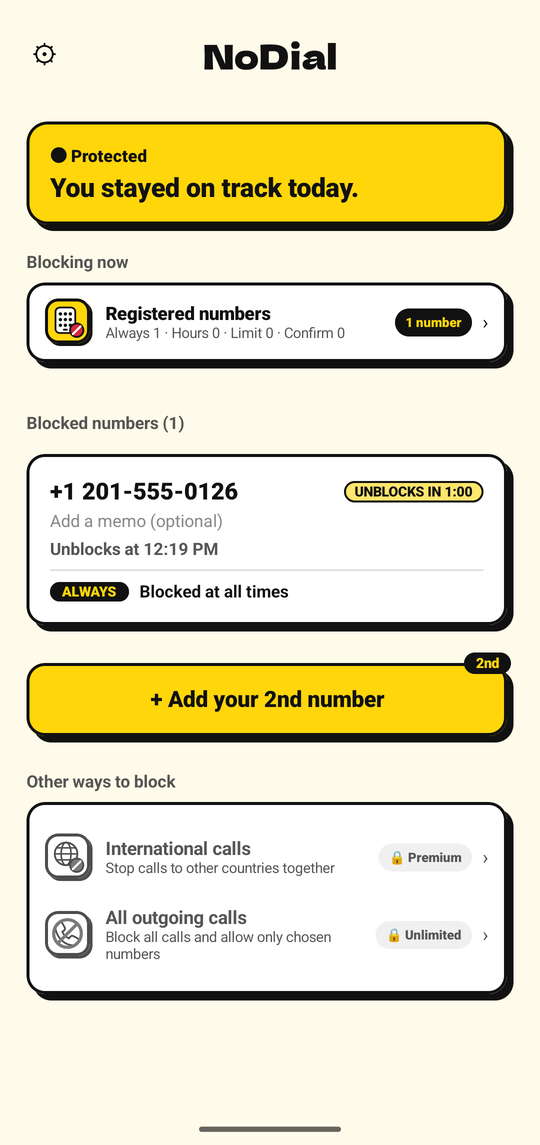
Turning a number off schedules the unblock for one hour later.
2. Canceling before the hour is up
Tap Cancel on the countdown at any point during that hour, and blocking resumes immediately — this is the exact same action as turning the toggle back on, so there's nothing extra to undo afterward.
3. Turning it back on
Once the hour elapses without being canceled, the number's status reads "Unblocked (calls go through)." Switching the Blocking toggle back on — whether moments later or weeks later — takes effect immediately, with no wait of its own. Only turning blocking off has the delay; turning it on never does.
4. Why the wait exists
A password protects a phone from other people. When the person you're trying to stop calling a number is yourself, you already know every password. A block that takes an hour to switch off is the one that holds in the moment it was set up for — the moment you most want to call is rarely the moment you should, and an hour is usually enough for it to pass.
5. International blocking and Block All are different
The one-hour wait described above applies only to turning off blocking for an individual number. International call blocking and blocking all outgoing calls both turn off the moment you ask — no delay, no confirmation countdown. Turning either of them on is also immediate. If you're relying on NoDial to resist a moment of impulse, that protection specifically comes from the per-number wait described here.
6. Emergency numbers
None of this affects emergency numbers — they can never be registered as a number to block in the first place, and emergency calls always go through, in every mode and every state.
- Choosing how to block a numberSwitching between modes is always immediate — different from turning off.Read more →
- International call blockingTurns off instantly — no one-hour wait here.Read more →
- Block all outgoing callsAlso turns off instantly, since version 2.7.0.Read more →
