
for AndroidWi-Fi security checker
NoSnoop: WiFi Security Checker
Is public WiFi safe? Scan for fake hotspots, DNS hijacking & weak encryption.

No account, no email · No ads, no VPN · Android 10+
What NoSnoop does
01
Check the Wi-Fi you're on in seconds
Free
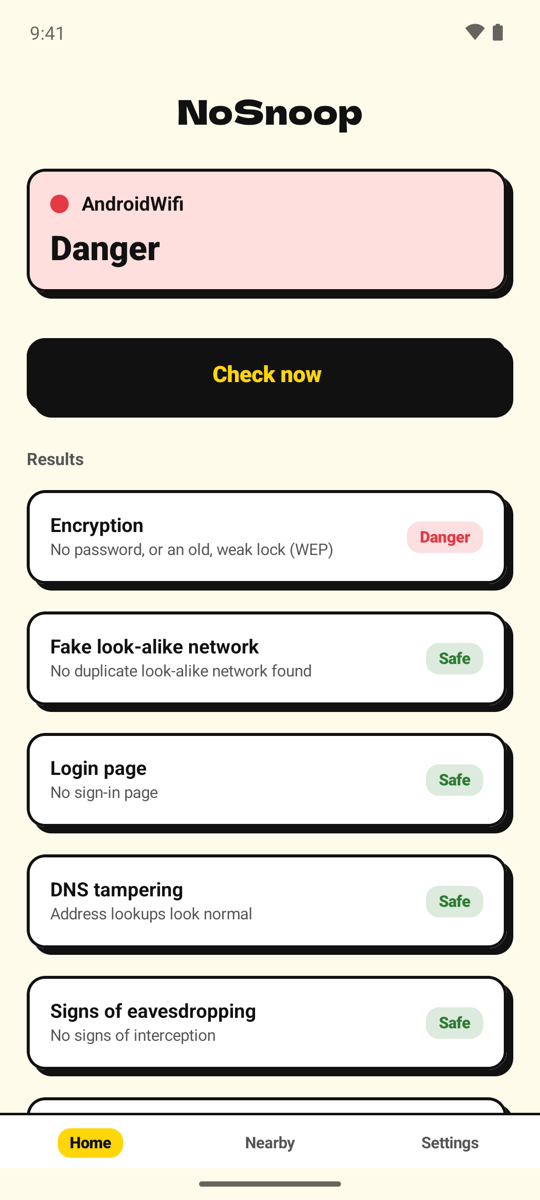
Tap Check now and NoSnoop runs six checks on the Wi-Fi you're connected to, then tells you whether it looks Safe, needs Caution, or is a Danger. All six checks are free.
02
See why, in plain words
Free
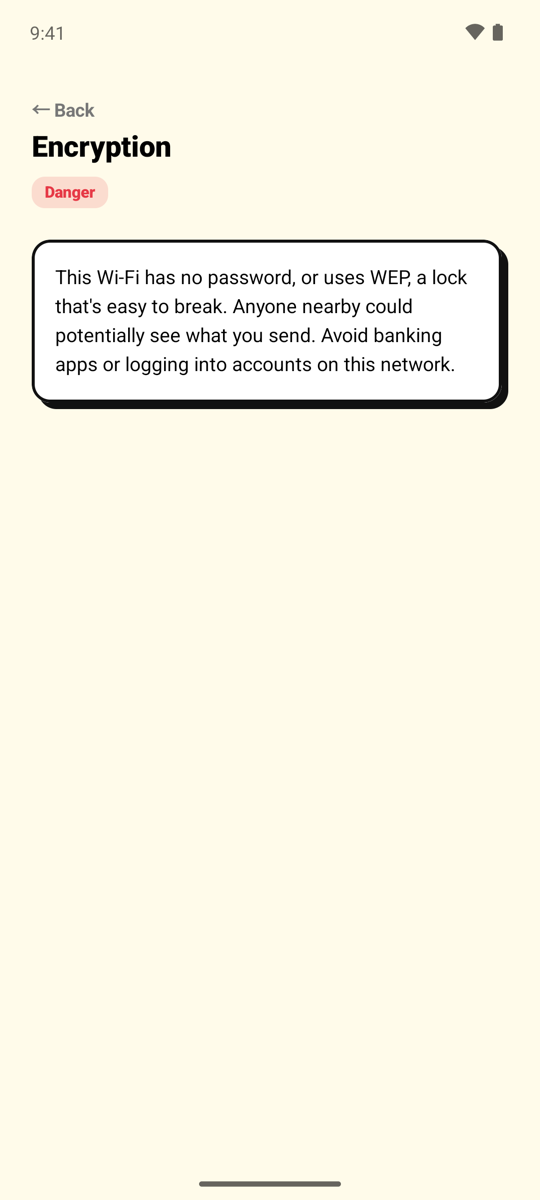
Tap any result to read what was found and what to do about it — for example, avoid banking apps on a network with no password.
03
Compare nearby Wi-Fi before you connect
Free: top network · 🔒 Premium: every network
At the airport, a café, or a hotel, open the Nearby tab to see the networks around you. The top one always shows its verdict for free; Premium shows the verdict for every network, so you can pick the safe one before you join.
04
Get alerted the moment you join an unsafe Wi-Fi
🔒 Premium
Turn on the auto-check and NoSnoop checks every Wi-Fi your phone joins. If it has no password or uses an old, weak lock, you get a notification right away. The network name is never shown in the notification.
The six checks
- Encryption
- Open networks and old WEP locks are flagged as Danger; old WPA as Caution. WPA2, WPA3, and OWE are Safe.
- Fake look-alike networks (evil twin)
- Warns when a network with the same name appears both with and without a password nearby — a common trick of fake hotspots. Several access points with one name, as in offices and hotels, is normal and isn't flagged.
- Sign-in pages
- Tells you when a hotel or café network uses a sign-in page, where what you type may be seen by whoever runs it.
- DNS hijacking
- Checks whether address lookups on this network are being redirected, using only lookups that should be identical everywhere — to avoid false alarms.
- Signs of eavesdropping
- Checks whether secure connections are being intercepted, and whether a proxy or an extra certificate has been added to your phone.
- Router ports
- Checks whether the router leaves risky doors open, such as telnet or an unencrypted admin page. NoSnoop only checks whether a door answers — it never tries to log in.
How it works
- 1Join a Wi-FiAt home, at work, or anywhere with public Wi-Fi.
- 2Tap Check nowSix checks run on your phone in a few seconds.
- 3Read the verdictSafe, Caution, or Danger — with what was found and what to do.
Honest about what it can't see
NoSnoop only says what an Android app can actually check. If something can't be checked, it says "Can't tell" instead of guessing. Some attacks, such as ARP spoofing on the local network, can't be detected by any Android app — so a "Safe" verdict is a good sign, not a guarantee. No scary threat counters, no VPN upsell.
Your Wi-Fi stays on your phone
Wi-Fi names, the networks around you, and every check result stay on your phone. There is no account and no sign-up.
Android requires the location permission for any app to read Wi-Fi names; NoSnoop uses it only for that and never stores or sends your location. The only thing we send is anonymous usage data to improve the app — which screens are used, how many checks were run and their overall verdict — never Wi-Fi names or locations.
See the privacy policy for details.
FAQ
- Is NoSnoop a VPN?
- No. NoSnoop checks whether a network looks safe; it doesn't encrypt your traffic or route it through a server.
- Why does it ask for location?
- Android requires the location permission for any app to read Wi-Fi names. Without it, the checks of the Wi-Fi you're on still run; only network names and the nearby list aren't shown.
- Can it see every device on my home Wi-Fi, or test my speed?
- Not yet. NoSnoop focuses on whether a network is safe to use.
- What do I need to use NoSnoop?
- Android 10 or higher.
- What happens if I switch phones?
- Subscriptions belong to your Google account: tap "Restore purchase" in NoSnoop on the new phone.
- Does uninstalling NoSnoop cancel my subscription?
- No. Uninstalling does not cancel the subscription. Cancel it in Google Play.
Know if a Wi-Fi is safe before you use it.
Android 10+